You should document every function you write (except p5.js functions like draw()) using JSDoc.
Writing JSDoc in VS Code
VS Code has built-in support that makes writing JSDoc a little easier. Start by writing your function. Then, on the line above the function definition, type /** and press Enter / Return. VS Code will automatically generate a JSDoc template tailored to your function. The video below shows how this works.
Write a description of the function on the first line of the generated template. The description should focus on the purpose of the function. You don't need to describe how it's implemented unless it's required in order to understand the function's purpose.
VS Code should have generated a template for each parameter (if there are any). The template will look like this:
@param {*} paramName
The asterisk, *, is a placeholder for the expected data type. The data types you're most likely to use are number,
boolean, and string. To represent an array (covered in Week 5), use the name of the data type stored in the array
followed by square brackets e.g.:
@param {number[]} xVals
See the JSDoc reference for more complex examples.
As well as specifying the type of your parameters, it's a good idea to add a brief description after the name that explain the meaning of the parameter. A well-named parameter might not need explaining but, if there's any ambiguity, add a description.
If your function has a return statement, VS Code will automatically add the JSDoc keyword @returns. Add the return data type
in curly braces and a description, if required. E.g.:
@returns {string} Description goes here
There are more examples in the JSDoc reference on the @returns tag.
The tags shown above (@param and @returns) are the most common but JSDoc supports many more. Take a look at the full list.
Reasons To Use JSDoc
(...aside from the fact that it's required in the assessment for this module!)
Complete documentation makes your code much easier to understand by other programmers. It is typically required if you are programming in a professional setting.
Writing documentation also has the immediate benefit of improving VS Code's code completion and hinting while
your're working on sketches. When you use p5.js functions in your sketches, you may have noticed that VS Code
provides hints that describe the function and show the expected parameters. These hints appear because the
p5.js source code is fully documented using JSDoc. Below is a screenshot showing what happens when you call the
circle() function. Note that the popover describes the function, shows the parameters, and even
highlights which parameter you should provide an argument for next.
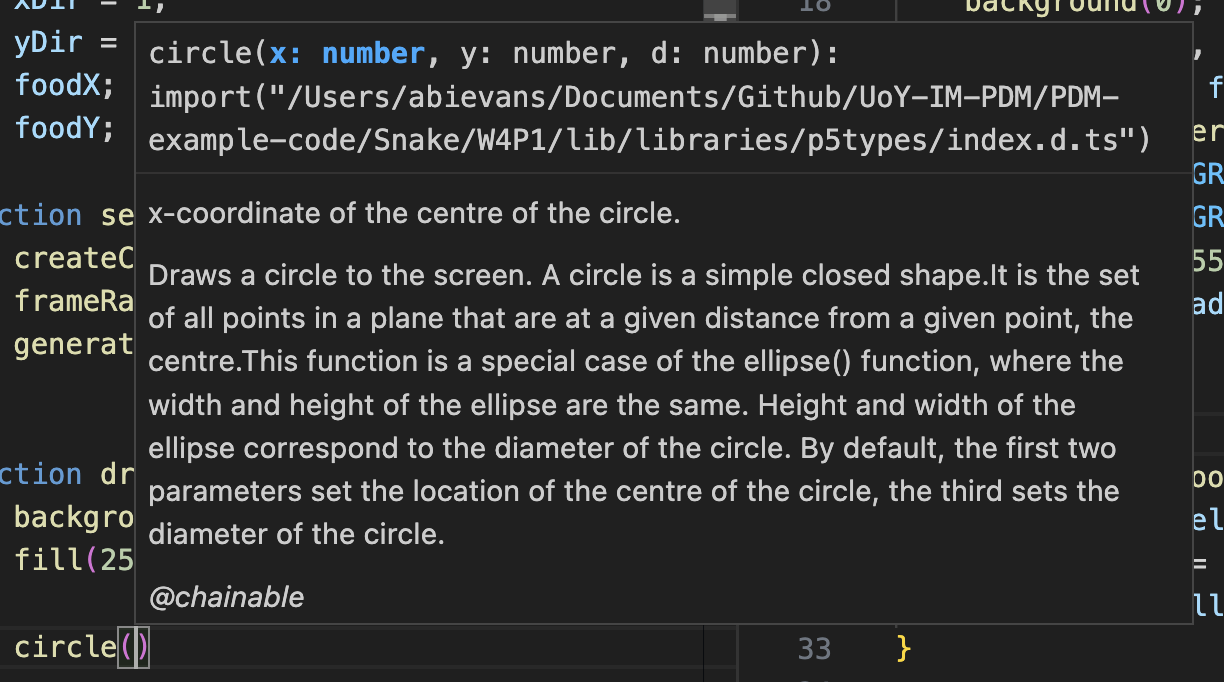
You can see the source of this documentation in the p5.js source code on GitHub. The circle() documentation
starts on line 274.